Player guides
Zoo Management
Learn how to manage a successful zoo.
Running a profitable zoo that cares for its animals while educating and entertaining Guests is the ultimate goal in Planet Zoo 2.
You'll need a few tricks up your sleeve before you can call your zoo a success!
Managing a zoo means keeping tabs on the various comings and goings, both human and animal!
Luckily there are a few tools in your arsenal to help keep the picture clear.
Management Tab
The Management Tab has useful reports on everything happening in your zoo, including:
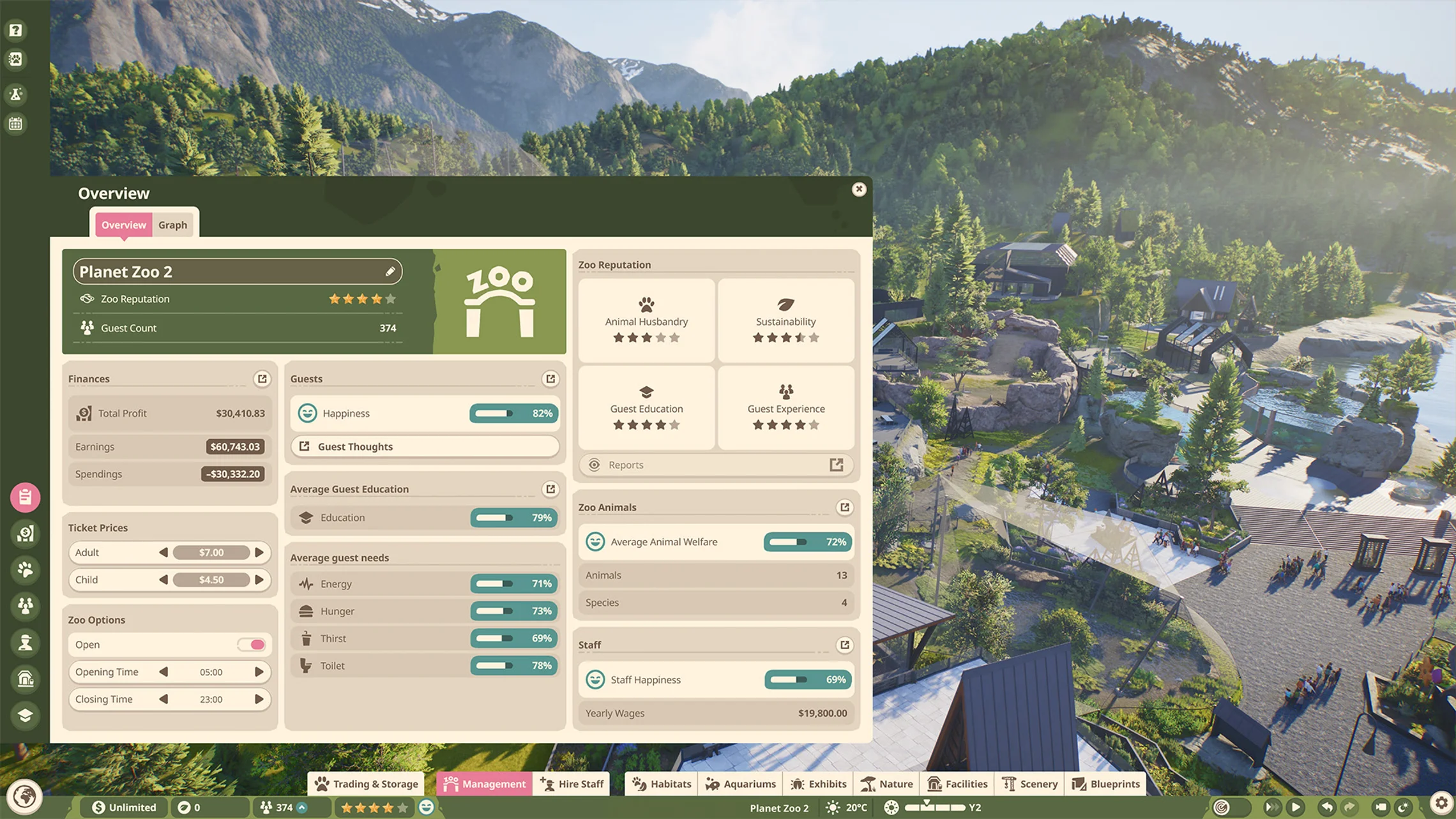
- Overview - the overall status of your zoo, including reputation and snapshots of your finances, Guest happiness, animal welfare etc.
- Finances - detail on how money is being made and spent in your zoo, along with options to encourage growth through marketing or get an influx of Cash through a loan.
- Animals - information on all the animals in your zoo, their names, appeal, location, age and more!
- Guests - statistics and information on your Guests, including how you are meeting their needs, their favourite animals, thoughts and spending habits.
- Staff - breakdowns of all the Staff you have employed in your zoo, with information and options for their salary, training level, happiness, energy and work zones.
- Facilities - performance data for your Facilities, including their Scenery rating, usage level, profit and status.
- Education - key details on education throughout your zoo, with summaries on the education items in use, Educators, topics and Research.
If you ever need information on how your zoo is performing or if you just want to dive into the data, the Management Tab is your first port of call!
Heatmaps
There are a variety of view modes available to help you manage your zoo. You can access these via the Heatmaps toggle in the HUD.
Various heatmaps are available for:
- Animal Welfare
- Habitats
- Buildings
- Utilities
- Elements with a negative impact on Guests
- Education Coverage
- Guest Needs
- Staff Happiness
For convenience, some Heatmaps are also triggered when performing actions such as placing power or water Facilities.
In some situations, a Heatmap might require you to make a specific selection, such as selecting an animal to view the Traversable Area Heatmap in context.
Zoo Reputation measures the performance of a zoo. The higher it is, the more Guests will visit the zoo.
How To Increase Zoo Reputation
To improve your zoo's reputation, you'll need to make sure you're doing well in the areas that contribute to the overall rating.
Head to the Overview screen in the Zoo Management tab and review your Zoo Reputation and ratings for Animal Husbandry, Sustainability, Guest Education and Guest Experience to identify any areas you're underperforming.
- Improve your rating in the lowest performing of these four factors. As you take any actions, check back to see how this has impacted your overall rating.
- You can also use the graphs in Management > Overview > Graph to see any trends or changes in your ratings.
- Repeat this process regularly to keep growing your Zoo Reputation.
Zoo Reputation is made up of four categories:
Animal Husbandry
Rates the quality of animal husbandry in this zoo. It is influenced by:
- the average welfare of all animals
- having a subset of animals in the Thriving state
How To Increase Animal Husbandry Rating
As a measure of the overall quality of your animal's care, the Animal Husbandry rating is an important measuring stick for your zoo's performance.
- Open the Overview screen in the Zoo Management tab and review your rating for Animal Husbandry to see how you're doing overall.
- Head to the Animals screen in the Zoo Management tab to see the full list of all your animals in the zoo. This includes a column showing the overall Welfare rating for each animal.
- Sort the list to show the animals with the lowest Welfare rating.
- Address the Welfare requirements of these animals to increase the overall average Welfare of your animals.
- Complete Research on the animals in your zoo to identify their Thriving requirements. Where possible, meet these requirements for the animals to achieve their Thriving status.
- Regularly repeat this process to maximise your Animal Husbandry rating.
Sustainability
Assesses the sustainability of this zoo's infrastructure. It is influenced by:
- the number of sustainable power sources
- the number of recycling bins
How To Increase Sustainability Rating
An environmentally friendly zoo helps champion the message of sustainability and conservation to its Guests.
- Open the Overview screen in the Zoo Management tab and review your rating for Zoo Sustainability to see how you're doing overall.
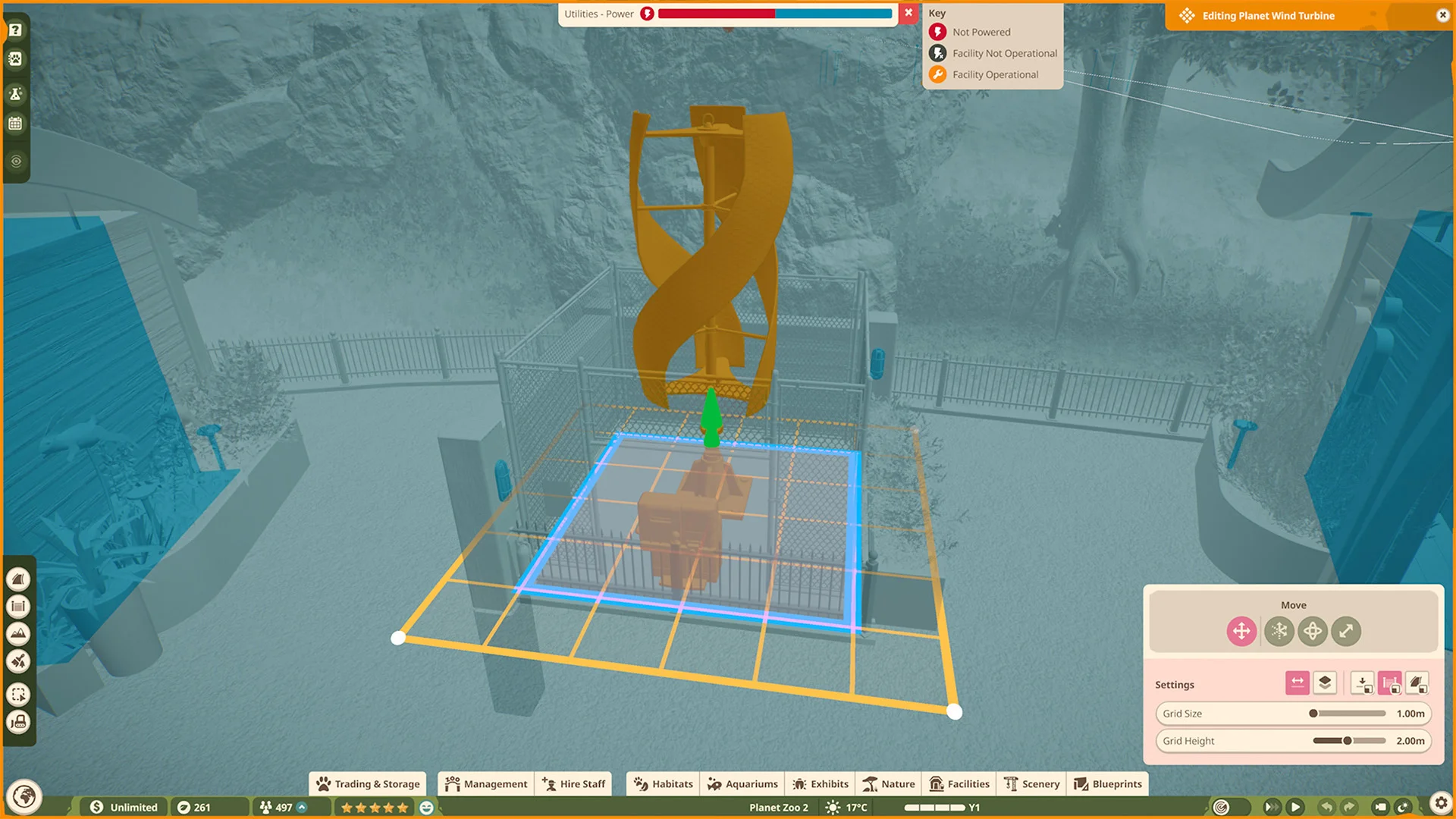
- If you're underperforming, place additional recycling bins throughout your zoo and replace standard power generators with wind turbines or solar panels where you can afford to do so.
- Regularly repeat this process to maximise your Sustainability rating.
Guest Education
Evaluates the quality and diversity of education offered to Guests in this zoo. It is influenced by:
- the average education of the most educated Guests in the zoo
- placement of the majority of education topics relevant to the animals in the zoo
How To Increase Guest Education Rating
Educated Guests will leave your zoo with a better understanding of animals and international conservation efforts.
- Open the Overview screen in the Zoo Management tab and review your rating for Guest Education to see how you're doing overall.
- Head to the Guests screen in the Zoo Management tab to see the Education rating for your Guests.
- Improve your Education by placing boards and speakers, selling audio guides and setting up tours with Educators.
- To increase your overall Guest Education rating, you'll also need to place the majority of education topics about the animals in your zoo. This may require conducting Research to unlock the topics.
- Regularly repeat this process to maximise your Guest Education rating.

Guest Experience
Represents how much Guests like their visit in this zoo. It is influenced by:
- the average happiness of Guests in the zoo
- the overall Scenery rating in this zoo
- having a diverse collection of appealing species
How To Increase Guest Experience Rating
Having a good day out is the ultimate measure of how your Guests think about your zoo.
- Open the Overview screen in the Zoo Management tab and review your rating for Guest Experience to see how you're doing overall.
- Head to the Guests screen in the Zoo Management tab to see the Happiness rating for your Guests and how you're meeting their needs.
- If you're underperforming for any of their needs address these as required, such as by building more toilets, adding additional drink shops etc.
- Guests like to see a good number of diverse animals in your zoo, so try and feature a mix of animals with different Habitat types such as Aquariums and from different locations around the world.
- Finally, you'll also need to make sure your zoo features plenty of attractive Scenery. Adding more Scenery will increase your Scenery Rating, but you can also focus your efforts by navigating to Management > Facilities > Guests and sorting by Scenery. This will show you which Facilities in your zoo have the highest and lowest Scenery, so you can work on the least decorated areas of your zoo.
- Regularly repeat this process to maximise your Guest Experience rating.
Turning a profit is the key to keeping the gates to your zoo open, but there's a few things you need to consider if you want to stay in the black and out of the red.
Cash
Cash is used to build your zoo infrastructure and pay your Staff.
You earn Cash from:
- Shops and Restaurants
- Donations
- Entrance Tickets
- Quick Trading Animals
How To Get More Money
Money makes the world go round and your zoo will need plenty of Cash to keep your animals and Guests happy.
- Open the Management tab in the Browser and navigate to Finances. From here you can see your zoo's income and expenses over the current and previous season.
- Review your income and determine if there are opportunities to get more Cash in. This could include increasing prices and placing more Donation Bins around your Habitats, Exhibits and Aquariums.
- Review your expenses and determine if there are opportunities to reduce your costs. This could include limiting planned expansions to your zoo, cutting Scenery, Facilities or rides with high running costs or reducing Staff wages - although be careful not to make your Staff unhappy!
- Alternately, take out a Loan for an immediate influx in Cash, but be sure you can afford to pay it back with interest.
- Regularly check the status of your finances to keep on top of your Cash. It's not unusual to go through periods of high expense as you build your zoo, but try and give your Cash time to recover as well!
Loans
You can take out Loans to receive a flat amount of Cash.
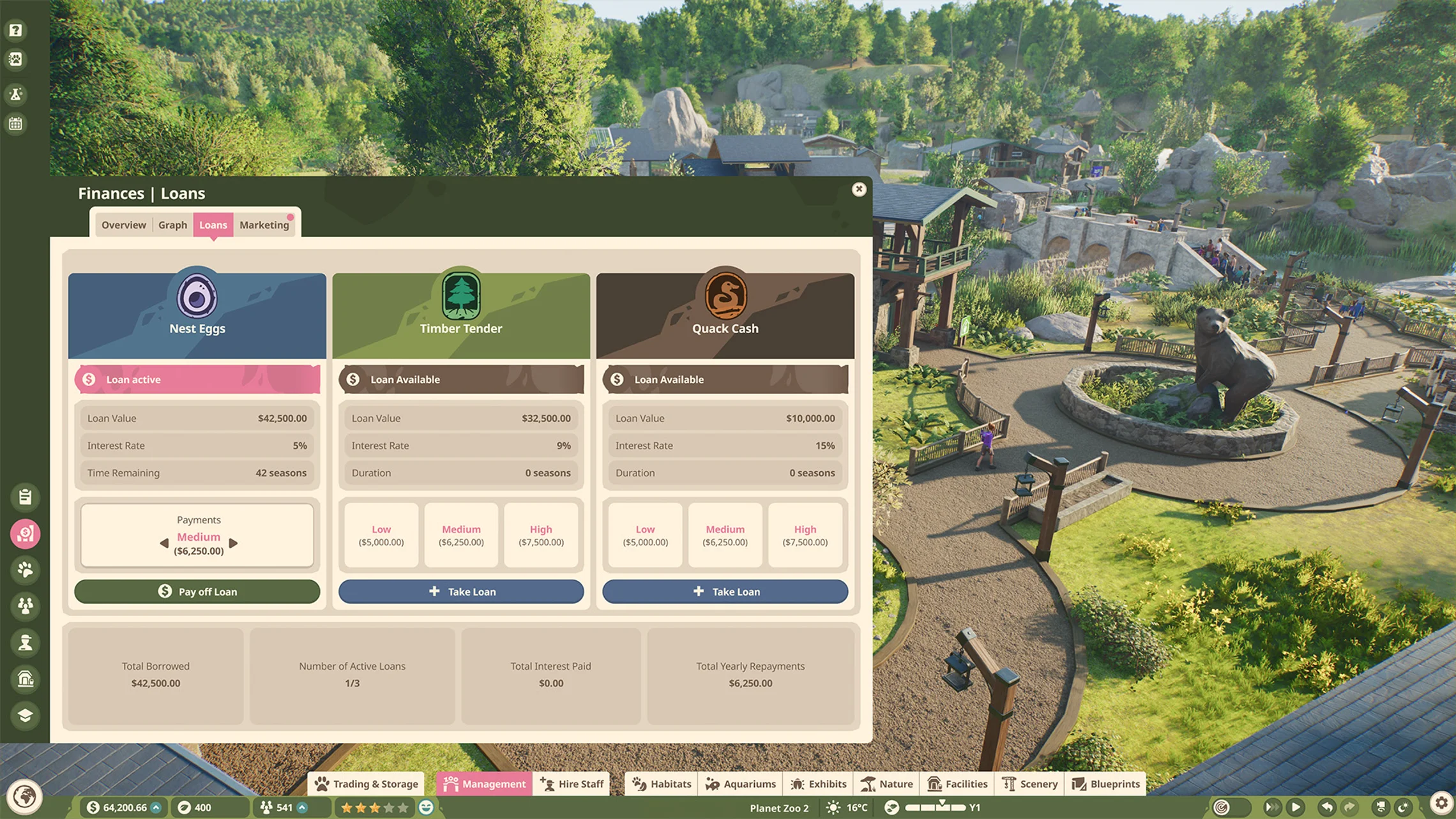
Loans are given by Loans Providers and will vary in Amount offered and Interest.
You can only take out one Loan from each Loan Provider at one time.
Payments are seasonal, and you can configure the amount paid back: High, Medium or Low.
How To Take Out a Loan
Taking out a Loan can be a good way to get a quick influx of Cash, if you can afford the interest.
- Navigate to Management > Finances > Loans.
- You will have up to 3 Loans available to choose from. Each will offer different values and interest rates, so make your choice carefully.
- Select Take Loan under the Loan you want. The Cash will immediately be available for you to use. You can see a tally of what you've borrowed, along with yearly repayments and the amount of interest paid on this screen.
- You can pay off your loan at any point by returning to this screen and selecting Pay off Loan.
Paying back more will shorten the time it takes to fully pay off the Loan.
You always have the option to pay off the Loan in full at any time.
Interest is applied to the remaining amount left to pay, so paying back quicker or outright in one go will reduce the amount of Interest applied to the Loan.
Ticket and Item Pricing
Zoo Entrance Tickets have a configurable price, which is how much a Guest needs to pay to enter the Zoo.
Guests are willing to pay more for a ticket to a better Zoo, but may refuse to enter if they believe they are overpaying.
Shop Items each have a configurable price that determines how much a Guest will need to spend. Guests are willing to spend more money on items with more appealing extras.
How To Change Ticket Prices
Admission tickets are one of the core ways your zoo brings in Cash.
- Open the Management tab in the Browser or select a Zoo Entrance Gate.
- Increase or decrease the price of adult or child tickets as desired.
- Keep a close eye on Guest Thoughts to see what Guests think of your pricing. If the ticket price is too high, Guests may choose not to enter your zoo, but if they're too low you could be leaving Cash on the table!
Donation Bins
Donation Bins provide a point at which Guests can make a donation towards an animal they have recently seen.
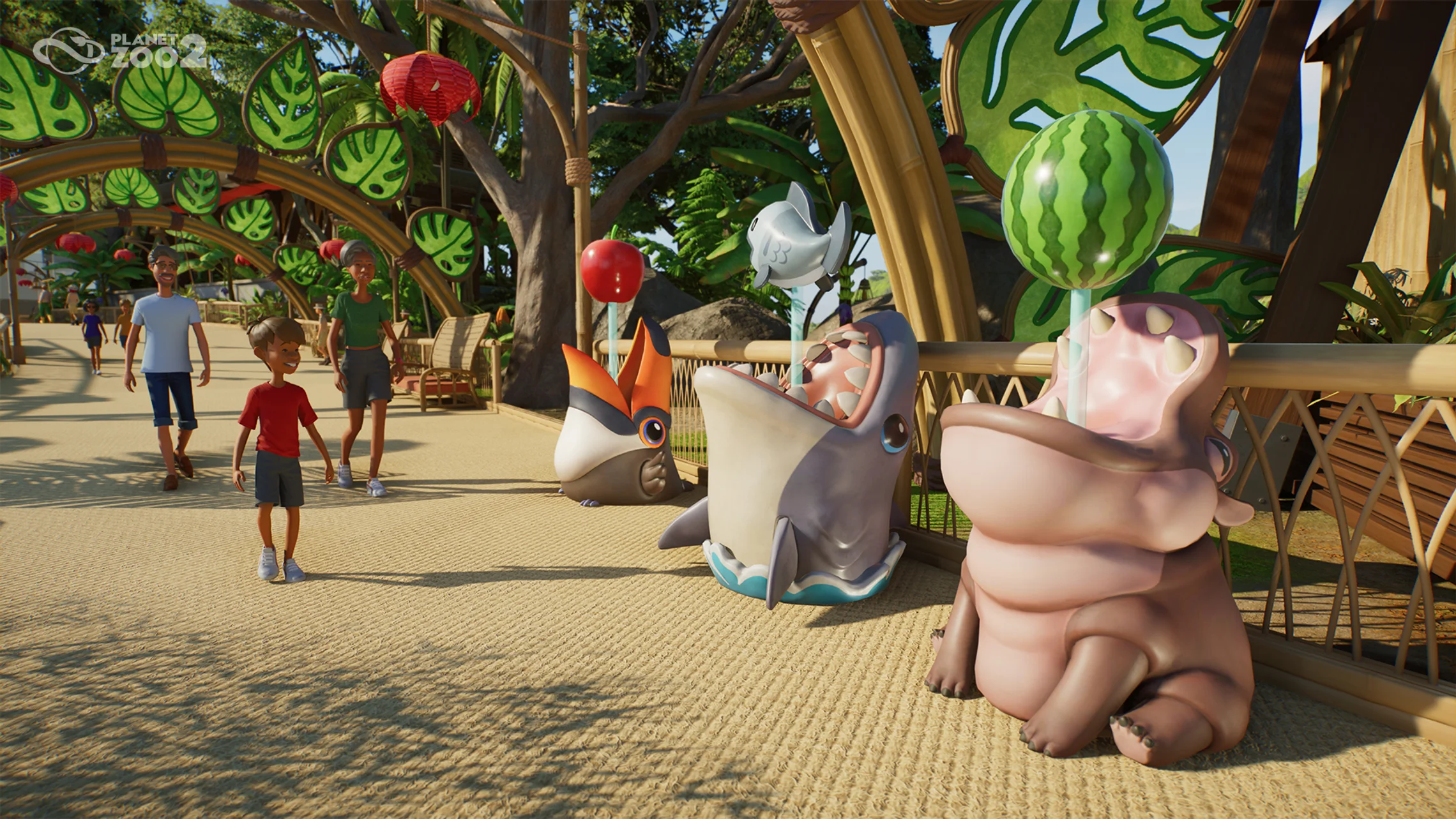
The better the view of the animal, the more likely Guests are to donate – and the greater the donations will be. Place them on paths near the busiest viewing points for the best effect.
Higher appeal and Thriving animals will also bring in larger donations.
Learn more about Thriving in the Animals guide.
Guest Cash
Guests enter the Zoo with a certain amount of Cash in their pockets. Once their held Cash is spent, they will be unable to make any further purchases or donations.
ATMs allow Guests to withdraw additional Cash when they are close to running out.
Guests can be charged for use of the ATM, but setting this value too high will make them unhappy.
ATMs must be placed on a path and have power to function.
Animal Appeal to Guests
The number of Guests attracted into the zoo is largely driven by the Appeal of all animals in it.
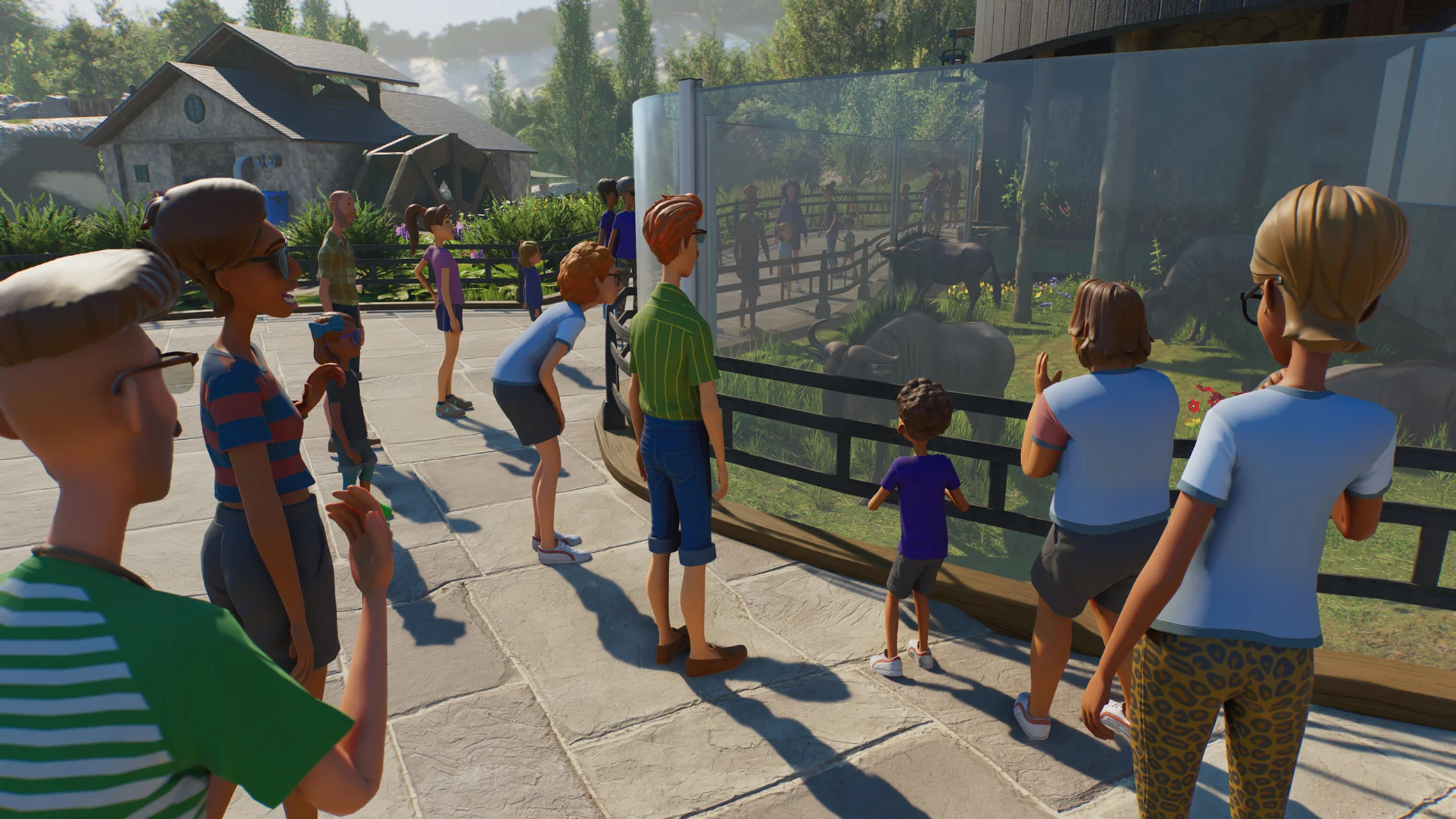
Each animal’s Appeal is determined first and foremost by its Species, and is then modified by its current Welfare, any Marketing bonuses, and how often it is viewed by Guests.
With every Guest that has successfully viewed an animal, its appeal increases up to the possible maximum, so good visibility is crucial for growing an animal's Appeal quickly.
Marketing
Marketing Campaigns are set up for individual animals in the zoo via Management > Finances > Marketing.
While a marketing campaign is active for an animal, its Appeal will be increased and will therefore attract more Guests to the zoo.
New marketing campaign slots for additional animals are unlocked when your Accreditation Tier increases.
Campaigns can be of Bronze, Silver, or Gold tier.
Both the cost of the campaign and the boost to animal appeal are increased at higher tiers.
How To Start a Marketing Campaign
Marketing Campaigns are a great way to bring in additional Guests to visit your zoo.
- Navigate to Management > Finances > Marketing.
- Depending on your Accreditation Tier, you will able to run up to 9 Marketing Campaigns.
- Select Start Marketing Campaign.
- You will be presented with a list of all the animals in your zoo, along with a seasonal cost of running the marketing campaign and the increase in appeal for the animal.
- Once you've made your choice, select Confirm.
- The Marketing Campaign will immediately start. You can see a running tally of your Marketing Campaigns and Yearly Marketing Costs on Management > Finances > Marketing.
- You can end your Marketing Campaign at any point by returning to this screen, selecting the active campaign and selecting Stop.
- You can also change the tier of the campaign here depending on your Accreditation Tier. Higher tiers will increase attractiveness further but have an additional cost.
Take conservation beyond your Zoos, and work with partners in Conservation Projects around the globe.
Invest Cash, Staff time, Animals and Release Groups to help complete these extra conservation efforts.
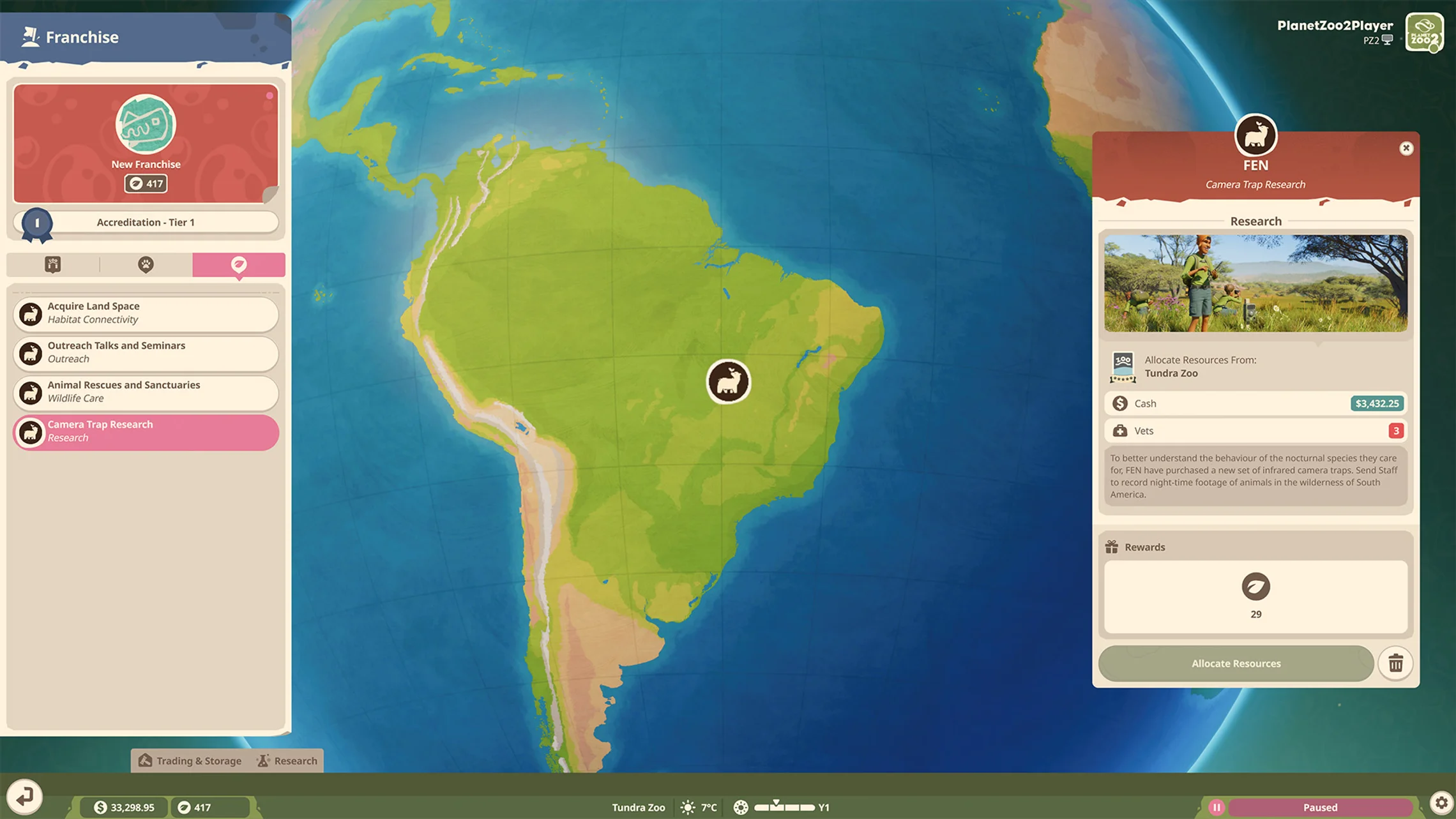
Conservation Projects will rely on you gathering and allocating resources from your current Zoo.
Any Staff members allocated to these projects will leave your Zoo and spend some time working out in the field.
Conservation Projects will most frequently reward you with Conservation Credits.
Some Institutions will also give you Animals or Release Groups as a result of the conservation work you complete together.
Check Gifts in Animal Trading to claim these Animals and Release Groups.
Conservation Credits
Conservation Credits allow you to adopt animals into your zoo.
In both online and offline modes you can earn them by:
- Releasing Release Groups into Wildlife Reserves or quick releasing animals. Animals with a higher interest rating, ones in their prime and with high-rated genes will earn more Credits.
To earn more Conservation Credits in Franchise Mode (online) you can:
- Trade animals via Animal Trading
- Contribute to Community Challenges
Conservation Credits are not shared between Franchise mode and offline modes.
Inspectors will periodically enter the Zoo and select up to five Animals to inspect.
They will head to each Animal's Habitat, and may check other Habitats not on their initial list, if they are on their way.
If the Inspector finds any Issues with an Animal or their Habitat, such as Disease, Injury or Dead Animals, they may issue a Fine.
If an Inspector comes across an Escaped Animal, the Inspection will end immediately and a maximum Fine will be issued.
Once an inspection is complete, a Report is issued providing details as to the running state of the zoo. Reports can be viewed at any time in Zoo Management.
Maintaining Facilities
Mechanics maintain Facilities to prevent them from breaking down, and can even repair a Facility that has completely failed.
Once a Facility has been attended by a Mechanic, it will gain a Service Badge making it immune to condition degradation for a time.
Mechanics will attend to Facilities as part of their normal patrol, but can also be urgently requested with the Call Mechanic in a Facility's Info Panel.
You can quickly check the condition of a Facility through its Info Panel or via Management > Facilities > Utilities.
Vets and Keepers can conduct a variety of Research in your zoos. To do so, they will need to spend time in an active Research Centre.
Researching a particular Species offers the chance to learn their specific Education topic, gain the ability to form Release Groups, boost their Fertility and learn their Thriving Requirements.
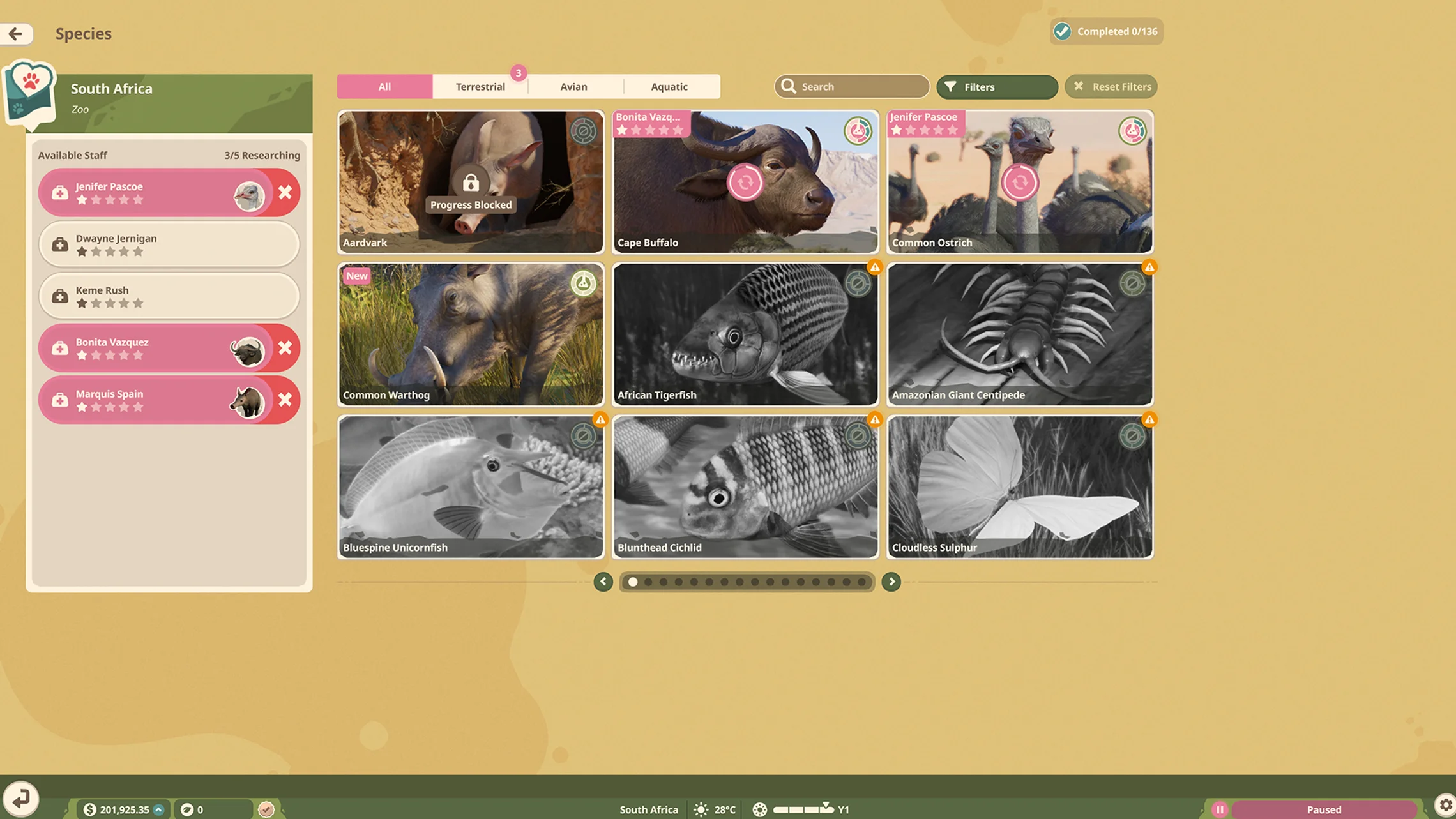
Enrichment Research grants more toy and food-based enrichment options across multiple species.
Researching Disease improves the immunity of all susceptible species against catching the Researched disease, reducing the likelihood of outbreaks, and containing their spread.
Education Research unlocks new educational topics for various education sources.
When Researching a particular species in the zoo, Staff will spend some time making direct observations at the Habitat or Exhibit and will split their time between there and the Research Centre. Some species must also be released and studied in Wildlife Reserves to fully Research them.
Staff prioritise other tasks, such as feeding or treatment over Research, so as to not neglect animal care.
Research completion persists across the entire Hub, representing the knowledge exchange across zoos.
How To Complete Research
To complete Research and unlock new insights about the animals you care for:
- Open the Research tab in the Browser.
- Choose which area of Research you'd like to pursue, from Species, Enrichment, Education or Disease.
- Browse the Research Topics available to find out more information and any unlocks or requirements such as housing the animal in your zoo. You will also need to have a Research Centre within your zoo in order to conduct Research, which can be found in the Facilities tab of the Browser.
- Select from the Available Staff shown and then select your chosen Research Topic.
- The assigned Staff member will then move to conduct the Research with progress shown in the Active Research alert, Research menu or the Staff member's info panel.
- Ongoing Research can be paused at any time if you need to re-assign your Staff member elsewhere.
- Once the Research has been completed, you will be notified along with details on any unlocks. If another tier is available within the same Research topic, your Vet will automatically begin Researching this upon completing the previous tier.
Depending on your zoo’s biome, season and time of day, there are different probabilities to trigger one of the following weather types:
- Strong Sun
- Clear Skies
- Cloudy
- Rain
- Snow
The ambient temperature is determined by the current weather.
Animals seek shelter from rain, snow or extreme temperatures. Sheltered areas are cooler in hot conditions, and warmer when it’s cold.
Guests purchase umbrellas when it rains, and are willing to spend more money on hot or cold food and drinks in the opposite conditions.
Temperature can be modified locally using heaters and coolers.
You can change an Aquarium's water temperature in its Info Panel.
Check the Habitat Shelter and Temperature Heatmaps to assess the shelter and temperature situation in the zoo.